Project · In progress
The NFC Jukebox.
Turning album artwork into a jukebox, one tap at a time.
The idea
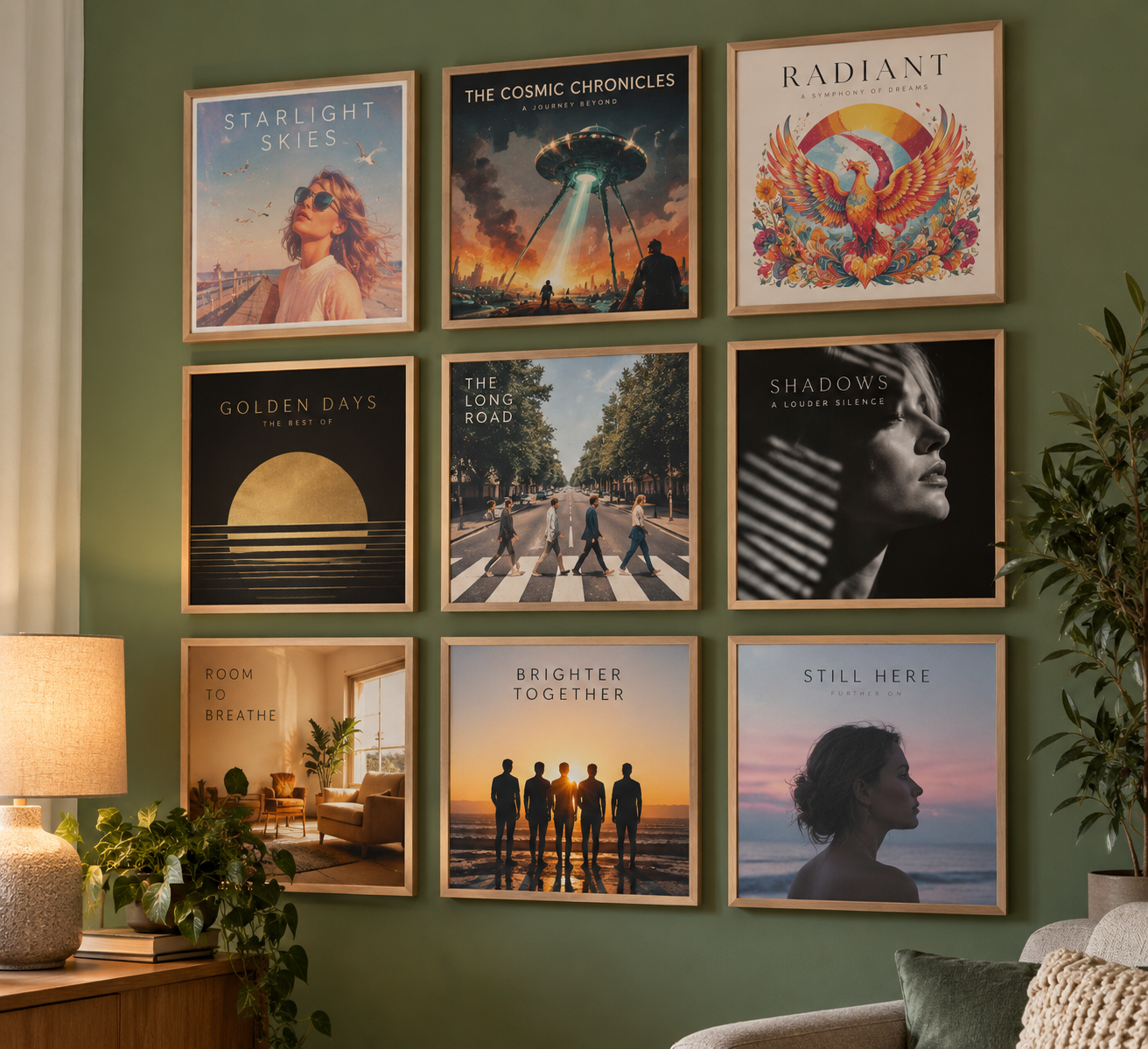
I wanted music to feel a little more physical again. Instead of opening an app and searching for something to play, I wanted to walk up to a wall of album artwork, tap the record I fancied and hear the music start.
The plan is a three-by-three display of favourite albums in slim natural-wood frames on a sage green wall. An NFC tag will sit behind each picture, invisible until a phone is held against it. No buttons, no screens, just nine albums on a wall that happen to play music.
From a tap to a tune
The phone reads the NFC tag and sends an album request to MadMcDade. The website puts that request in a queue, and a Raspberry Pi collects it and plays the music. The Raspberry Pi acquired a name almost immediately: Taylor Swift.
Taylor Swift's 1989 became our first test album. When Welcome to New York finally came out of the Echo speaker, the idea stopped being a diagram and became a working jukebox.
NFC tag → MadMcDade → queue → Taylor → music
Version 2: The website takes charge
The first version proved that a tap could start a song. Version 2 gave the jukebox a proper connection to MadMcDade: album requests, a queue, a now-playing display and a record of recently played albums. The website became the control room, while Taylor did the actual playing.
There was one memorable diversion. During development, the jukebox's neon styling escaped onto the rest of MadMcDade and briefly made the whole website look like a nightclub. A backup and some careful repairs put things right. The neon was allowed to stay on the 1989 request confirmation page, where it belonged.
October 2026: Taylor has a wobble
On 4 October, Taylor stopped booting properly. The Raspberry Pi appeared to be alive, but its microSD card could no longer get it onto the network. We made and verified a raw image of the original card on the Mac before attempting a rebuild.
While Taylor was out of action, we explored whether smart speakers and Google Home could replace the Pi altogether. They could play music when asked, but getting the website to trigger playback automatically was another matter. Taylor remained the most practical bridge between a tap on the wall and music in the room.
Version 3: A library of our own
For Version 3, we tried a new direction: store the music locally rather than depend on an online music service. A 1 TB USB hard drive joined a Raspberry Pi Zero W. We built a SQLite library of 34 albums and 555 tracks, and a Python controller used MPV to play them through a Majority D100X Bluetooth speaker.
It worked, at least for a while. We could browse the library, start albums and hear 1989 (Deluxe Edition) play. Then the music began freezing. Sometimes it stopped after a couple of tracks; sometimes the player and speaker still appeared connected even though nothing could be heard.
We investigated Bluetooth reconnection, the player and background services, but never established a definite cause. Rather than pretend we had solved it, we retired Version 3 and kept its files and database. The lesson was clear: reliable playback first, extra features second. And this time, document the build.
Version 4: Taylor Swift returns
By 19 October, it was time for another clean start. Taylor moved to a Raspberry Pi 4, with Raspberry Pi OS, Python and MPV. The 1 TB My Passport drive mounted automatically at /mnt/music, and Taylor was reachable over Wi-Fi and SSH at taylorswift.local.
We restored the jukebox controller, reconnected the website queue and got local playback working again. MP3 and FLAC files both played successfully. A library scanner could catalogue the music and send updates to MadMcDade automatically, rather than relying on us to enter everything by hand.
The music was back. This time, Taylor had a sturdier foundation and a much better record of how everything fitted together.
Backups, blueprints and Bob's Workshop
After several rebuilds, backups stopped being an afterthought. Taylor now has an automatic backup routine that runs hourly during development, verifies the resulting archives and retains recent copies on the external drive. Build commands, settings and test results are recorded in Bob's Workshop build journal.
We also created a full SD card image of the working Version 4.2 system, our GOLDEN backup. Crucially, we restored it to a spare card, booted Taylor and checked that the restored system worked. That's a recovery plan we've actually tested, not just a file we're hoping will save us one day.
Version 5: A jukebox in your pocket
By 23 October 2026, the jukebox had grown beyond its original wall-mounted idea. If Taylor could play music at home, why not let me listen to my own collection on my phone as well?
We installed Navidrome, a self-hosted music server, on Taylor and pointed it at the existing hard-drive library. The albums appeared in a browser, and music played successfully on both the computer and iPhone over home Wi-Fi.
Not every album was perfectly organised. A Madonna Essentials playlist, for example, contained songs drawn from several original albums, each with its own metadata and track numbering. That's a library-tidying job for another day, not a reason to hold up the music.
Taylor goes mobile
Next came Tailscale, which gives Taylor and my iPhone a private, encrypted connection without opening ports on the home router. We connected both devices, switched off the iPhone's Wi-Fi and tried Navidrome over mobile data.
It worked. Music streamed from the hard drive at home, through Taylor, straight to the phone. MadMcDade's web hosting didn't have to carry the audio, and I could listen to my own music away from home.
The first successful NFC tap made the jukebox real. Hearing Taylor play through a phone on mobile data was another of those moments worth celebrating.
What comes next
The next goal is a dedicated music interface at music.madmcdade.com, with album artwork, searching, playback controls, a queue and listening history. Visitors should be able to explore the collection without controlling the jukebox, while private listening and administration remain protected.
We still need to tidy some music tags, finish the Version 5 build and make another fully tested master backup. And then there's the thing that started all this: printing the album artwork, fitting the hidden NFC tags and putting those nine frames on the wall.
What began as a picture on a wall is now a working jukebox, a home music server and a personal streaming service. The wall itself is still waiting for its grand opening.